Edit the welcome messages
Change the mortal or immortal welcome message, preview terminal colors, and save without overwriting another operator’s changes.
Choose Staff tools → MOTD in the admin console, or open the MOTD card on the dashboard. Builders can open the page and read both messages. Only staff at GRGOD (level 38) or higher can save; other staff see read-only text.
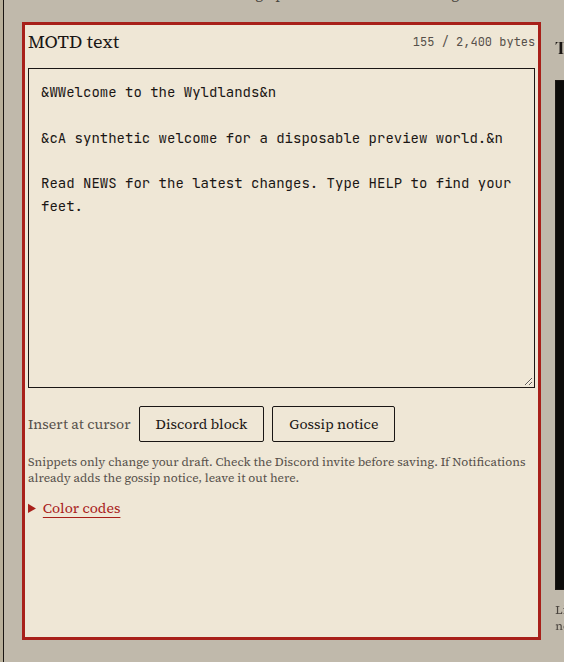
Edit a welcome message
Section titled “Edit a welcome message”- Choose MOTD for mortal characters or Immortal MOTD for immortal characters. Immortals see their message instead of the regular one.
- Edit the text. Each tab keeps its own draft while you switch between them.
- Check the Telnet preview. Choose 40, 80, or 100 columns to see where a terminal wraps each line, including long words. On a narrow screen, scroll sideways inside the preview.
- Toggle Color to compare rendered colors with the text containing the color codes. Preview controls don't change your draft.
- Choose Save MOTD or Save Immortal MOTD. Save each message separately. The saved message takes effect at once. Players see it at their next login; no reboot is needed.
Each message allows 2,400 bytes. The counter includes two bytes for each line break and counts text as UTF-8, so some characters take more than one byte. Shorten an over-limit message before saving.
Open Color codes for the available markers. Lowercase codes use ordinary
colors, uppercase codes use bright colors, &n resets the color, and &&
prints an ampersand.
Insert a snippet
Section titled “Insert a snippet”Place the cursor where you want the snippet, or select text to replace.
- Discord block asks for an invite. Enter your own HTTPS invite from
discord.ggordiscord.com/invite, then choose Insert Discord block. There is no preset invite. Check the address before saving. - Gossip notice inserts: "What's said on gossip echoes to our Discord."
Snippets only change your draft. They don't save it or change Notifications.
Keep or discard a draft
Section titled “Keep or discard a draft”Load saved copy replaces the selected tab's draft with the saved message. If that tab has unsaved changes, confirm before discarding them.
Leaving the page or closing the browser warns about unsaved changes in either tab. Drafts last while this editor stays open; they aren't a backup. Copy any text you need before leaving.
If someone else saves first, your save stops and your draft stays here. The comparison marks the saved copy with − and your draft with +. Copy the changes you want to keep, choose Load saved copy, then make your changes again and save. If saving fails for another reason, check your connection and access, then try again.
How it works
Section titled “How it works”The page lives at /admin/staff/motd. It uses the existing fileEditApi with
the tedit root and the motd and imotd fields. Reads return an ETag; saves
send it with If-Match. A stale ETag returns 412 without overwriting the saved
text. Successful saves write the existing text file, refresh the live message,
and record a file_edit_save audit entry.
The shared web tedit save floor is GRGOD (38), matching the command gate in
src/interpreter.c:764 (R2/R5e). Fields requiring IMPL (40) keep that higher
requirement. Lua file writes still require HIGOD (36). Builder reads remain
available. The byte limit counts CRLF line endings; saved text uses LF endings.
The preview uses xterm with the game's ampersand color markers. It changes neither saved text nor game output. This editor adds no default player text and doesn't change existing login behaviour (R1/R4).