Configuration settings
Change operator settings, back up or restore their bundle, and understand which changes need a restart on a managed or checkout server.
Configuration is under Staff tools and requires implementor access (level 40). It changes settings for the running server. For the portable release transaction, see Update your server.
Choose where to change a setting
Section titled “Choose where to change a setting”On a managed instance, use the Network card to enable or disable telnet, TLS telnet, or WHOD (the separate player-list listener), set their ports, and choose whether each listener is local or public. The HTTP address and port are read-only here. Change them while the world is stopped.
On a checkout deployment, the Network card is read-only and points to the server command-line flags. Exported environment settings continue to take precedence over the settings file.
This capture shows the editable Sessions & limits card in the local checkout preview. The Network card is read-only in that mode; this isn't a managed-instance view.
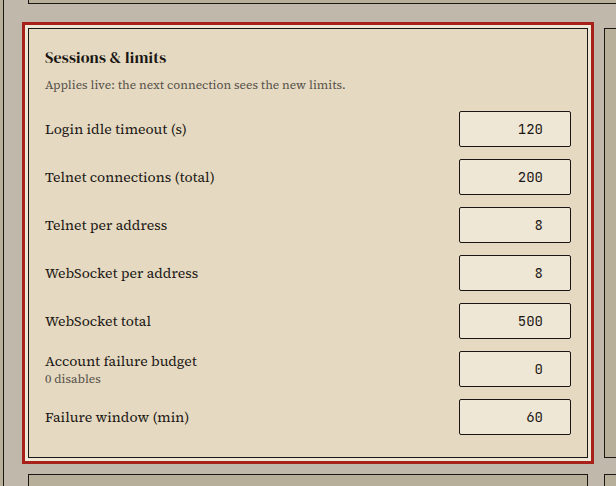
Other groups cover proxy trust, browser origins, the Grapevine relay, staff-log notifications, and contact-form delivery.
Apply changes
Section titled “Apply changes”Each setting says whether it takes effect live or needs a restart. Settings marked for restart show which fields will change and how many players are online. Choose Apply and restart to save them. The launcher saves players, restarts the world, and checks that the requested listeners answer. If a listener can't start, it restores the previous settings and restarts with them.
The Network card refuses port collisions. Before making a listener public, review the exposure change it shows.
Back up or restore settings
Section titled “Back up or restore settings”Choose Download bundle to export settings, the revision, and server version. Secrets are excluded. To restore, choose Upload bundle, review the field-by-field comparison, then confirm the apply step. Unknown keys are shown but ignored; saved secrets remain unchanged.
How it works
Section titled “How it works”Saves use revision checks. If another operator saves first, reload before applying your changes. On a checkout server, the first run imports its current environment into the settings file; later environment exports still override their matching fields.
Secret fields are write-only and encrypted beside the settings file. A save
keeps the prior file as settings.json.previous; a damaged settings file makes
the server use defaults and refuse further saves until it's repaired. The
server records each change in its audit log, which the History card displays.