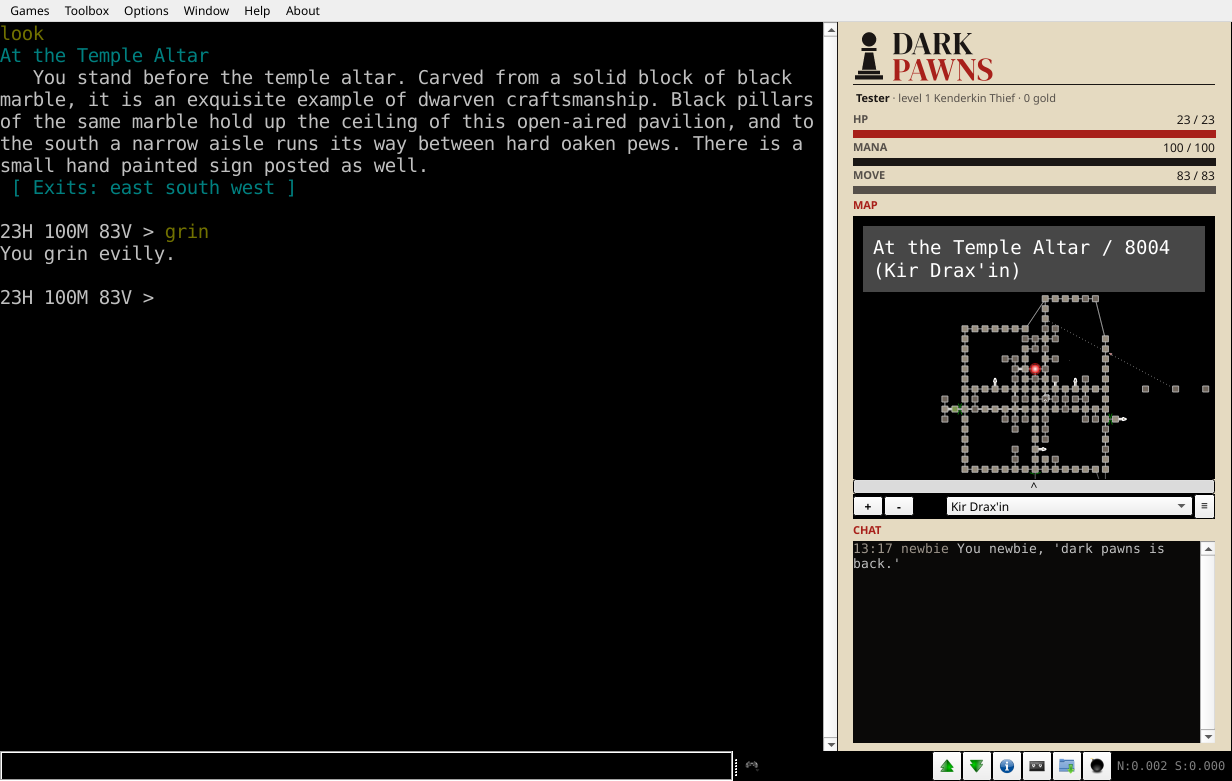
Mudlet is a free MUD client for Windows, macOS, and Linux. Connect it to Dark Pawns and it dresses itself for the game: a dock with your health, a map of the whole world, and a chat window. The game's text stays exactly what every other player sees.
Connect
- Download Mudlet, then make a new profile with the server address
darkpawns.org, port 7778, and Secure ticked. - Connect. Before the name prompt, Mudlet downloads the Dark Pawns package, installs it, and opens the dock on the right.
Port 7778 uses TLS, so your password stays between you and the game. Use the name darkpawns.org rather than an address, because the certificate belongs to the name. Port 7777 still answers in the clear; connect there and Mudlet offers to move you to the secure port, an offer worth taking.
The dock
From the top: the Dark Pawns mark, a line with your name, level, race, class, and gold, then your hit points, mana, and movement as numbers over thin bars. Below them sit the map and the chat window.
Everything in the dock comes from data the game sends beside its text, over Mudlet's GMCP channel. The package reads no game text, fires no triggers, and never sends a command you didn't type.
The map
On your first connection the whole world map loads into the dock, and it refreshes itself when the builders change the world. If the profile already holds a map you drew by hand, the package asks before touching it: type dp map to swap in the world map.
Your marker follows you from lit room to lit room. In darkness, or blind, the game names no room, so the map waits for the next one you can see. Double-click a room to walk there.
Commands
The package adds one word, dp. Everything else you type goes to the game untouched.
| Type | To |
|---|
dp | see the package version and these commands |
dp hide, dp show | put the dock away, and bring it back |
dp clear | clear the main window |
dp clear chat | clear the chat window |
dp map | load the world map, replacing this profile's map |
The game's own clear sends the escape codes that wipe a terminal. Mudlet's window is a scrollback, not a terminal, so they do nothing there. Use dp clear.
When something is off
No dock, and dp answers Huh?!?. The package isn't installed: disconnect and connect again, and Mudlet installs it fresh. Mudlet 5.0.1 occasionally loses an upgrade this way.
No dock at all, ever. Install the package by hand: download darkpawns.xml, then in Mudlet choose Toolbox → Package Manager → Install and pick the file.
You want Mudlet plain. Uninstall darkpawns in the Package Manager. The dock goes with it, and the game plays the same.
For scripters
The data behind the dock is yours to use in your own scripts. The messages and their fields are documented in docs/gmcp.md, and the package's source is in mudlet/.